For: Byron · Status: PROPOSAL ONLY — no build, no mockups yet, per instruction
Sources of truth: Lightroom Classic catalog (.lrcat, Windows PC) · Excire AI metadata · originals on NAS (read-only)
Problem. 450k photos in a Lightroom Classic catalog that's slow to work in, hard to query, and invisible to your agent fleet — despite years of invested tagging (LR keywords) and a full AI pass (Excire) already sitting in databases you own.
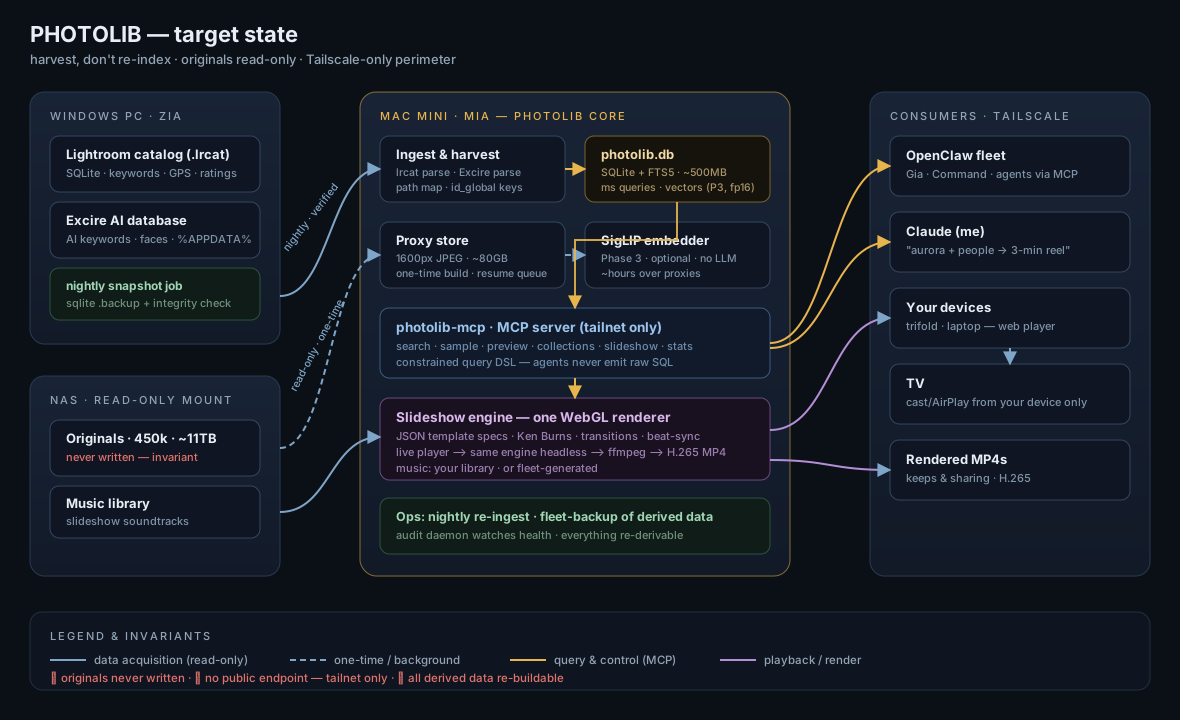
Proposal. Don't re-index — harvest. Build Photolib: a lightweight metadata index (single SQLite file, ~500MB, millisecond search) extracted directly from the .lrcat and Excire's data, living on the Mac Mini, fronted by an MCP server on the tailnet so you — and any fleet agent — can query, curate, and compose. Browsing and slideshows run off ~80GB of one-time proxies, never touching NAS originals (read-only, always). A slideshow engine with JSON template specs and a single WebGL renderer (instant playback on your devices; the same engine headless-rendered to MP4) targets ProShow-class output: Ken Burns, transition templates, your music with beat-synced cuts. Semantic "describe it" search is a deliberately-gated Phase 3 — a small SigLIP embedding model, hours of compute, no LLM, only if the harvested keywords prove insufficient.
Cost & risk honestly. The metadata index is small and fast — that part is easy. The two real costs are one-time: proxy generation (days of throttled background I/O, or shortcut via Lightroom's own preview pyramid) and the Excire harvest (its data is siloed; prefer parsing its DB read-only, fall back to a carefully-controlled export). Everything is read-only against your originals and catalog; the whole thing is re-derivable; nothing gets a public endpoint.
Decision sought. Approve Phase 0 only — 1–2 days of measurement (catalog inventory, sample harvest, the aurora acceptance query, NAS throughput, path-resolution audit). It converts every assumption in this document into a measured fact, and you get mockups + the MCP schema with the results. Five inputs needed from you (§8).
Photolib target-state architecture — full diagram (SVG)
450,000 photos sounds like an indexing mountain. It isn't — because two engines already climbed it:
AgLibraryKeyword / AgLibraryKeywordImage), captions, ratings, picks, GPS, capture times, camera data, folder structure, collections, and a full XMP blob per image (Adobe_AdditionalMetadata) are all directly queryable — no Adobe APIs, no export, no Lightroom running. Community tooling (lrcat-extractor and others) has mapped the schema.%APPDATA%\Excire Foto), NOT in your files. Excire's sanctioned bridge is its "Store Metadata" command, which writes its AI keywords into XMP (embedded or sidecar). One one-time export run and that intelligence becomes portable forever. (If you used the Excire Search plugin inside LR and saved keywords back, much of it may already be in the catalog — Phase 0 verifies which.)So the strategy is: harvest, don't re-index. Build a lightweight, agent-native index from what exists; add new AI only incrementally, only where the harvest has gaps.
Windows PC                      Mac Mini (Mia)                     Anywhere
┌─────────────┐   nightly copy  ┌──────────────────────────┐
│ .lrcat      │ ───────────────▶│ INGEST  lrcat + XMP      │
│ Excire DB   │  (Zia/robocopy  │   ↓                      │
│  → XMP once │   to NAS share) │ PHOTOLIB.db (SQLite)     │   MCP over Tailscale
└─────────────┘                 │  images/keywords FTS5    │◀── OpenClaw fleet
      NAS (read-only SMB) ─────▶│  faces·gps·ratings       │◀── Claude (me)
      │ originals (never write) │  vectors (sqlite-vec)*   │
      │ music library           │ PROXIES 1600px JPEGs     │
      └────────────────────────▶│ SLIDESHOW engine         │──▶ web player (any screen)
                                └──────────────────────────┘──▶ ffmpeg MP4 render
                                                     * Phase 3, optional
Photolib.db — one SQLite file with FTS5 full-text over keywords/captions/paths + structured columns (time, GPS, rating, faces-count, camera). 450k rows ≈ 300–600MB. Query latency: single-digit milliseconds. This is the whole "database size" fear dissolved: metadata at this scale is small; it's pixels that are big, and we never move them.
Proxies — browsing/slideshows never touch NAS RAWs. This is the true long pole, stated honestly: 450k RAWs × ~25MB ≈ 11TB of NAS reads; at a sustained 100–200MB/s that is 15–30 hours of pure I/O plus RAW decode at 0.5–2s/image ≈ 2.5–10 days of throttled background compute — a multi-day pipeline with a resume queue and failure reporting (at 450k, a 1% failure rate = 4,500 files someone must account for: exotic RAWs, CMYK TIFFs, broken EXIF, orientation chaos). Two mitigations change the game and get measured in Phase 0: (a) harvest Lightroom's Previews.lrdata pyramid instead — already-rendered JPEGs incl. your edits, no RAW decode at all; coverage/size audited in Phase 0; (b) LR batch-export on the Windows PC (renders with your edits applied, uses the PC's already-local disk bandwidth). Output ≈ 80GB of 1600px JPEGs either way. Proxies key on LR's id_global UUID (stable across renames/moves), with edit-invalidation (touch-time check) so re-edited photos re-proxy.
MCP server (photolib-mcp on Mia, Tailscale-only) — the fleet hook you asked for. Tools:
search(query) — structured DSL and natural language ("northern lights, at least one person, rating ≥3, 2019-2025") compiled to SQLsample(query, n, strategy) — curated picks for agents (spread across time/places)photo(id) / preview(id, size) — metadata + proxy bytescollections — create/list/append virtual setsslideshow(spec) — build + return player URL or rendered MP4stats() / keywords() / faces() — corpus introspectionAny OpenClaw agent — Gia, me, Command — can then direct photos: "pull 40 best aurora shots with people, make a 3-minute reel to this track."
Your demo query — keyword ∈ {aurora, northern lights} AND faces ≥ 1 — is the Phase 0 acceptance test, not a promise: it works if Excire's fixed taxonomy emits an aurora concept and its face counts survive harvest as queryable fields (they may export as "one person"/"group" keywords rather than numbers). Phase 0 runs this exact query against a 500-photo sample harvest before anything else is built. If Excire lacks the concept, the query lands in Phase 3 (semantic) instead — still no LLM needed.
You're right to distrust Gemma for this — but the right tool isn't an LLM at all. CLIP-family embedding models (SigLIP-base ONNX) are the standard for photo semantic search: ~400MB, and they enable "moody beach sunset with silhouettes" queries beyond keywords. Honest numbers (to be measured in Phase 0 on Mia, not assumed): at an unverified 40–80 img/s from local proxies, 450k ≈ 2–4 hours of embedding compute — the gating dependency is that proxies must exist first (see the proxy long-pole above). Storage: 450k × 768-dim fp16 ≈ 700MB in sqlite-vec (fp32 would be 1.4GB). Query honesty: brute-force vector search over 450k is ~100–300ms per query, not the millisecond class of the FTS index — fine for interactive use, stated so it's never a surprise. Phase 3, only if the keyword harvest leaves you wanting — my bet is Excire's tags cover 80% of real queries.
ProShow Producer's essence: timeline of slides → layered motion (Ken Burns pan/zoom), transition library, music-driven timing, render to video. Plan:
zoompan Ken Burns. (a) instant web player — crossfade/push/dissolve/parallax-zoom/dip-to-black, Ken Burns with face-aware framing where face data exists; (b) H.265 MP4 export via the same engine.{sections:[{query|photos, duration, transition, motion, textOverlay?}], audio:{src|generate, sync:"beats|bars|off"}}. We define 3–4 signature templates together (e.g. Documentary slow-cross, Energetic beat-cut, Cinematic letterboxed parallax) and agents compose from them. Because it's a spec, "Gia, aurora reel, template Cinematic, use track X" is one MCP call.| Phase | What | Effort | You get |
|---|---|---|---|
| 0 | Discovery & measurement: catalog snapshot to Mia, keyword/faces/GPS inventory, Excire DB parse attempt, 500-photo sample harvest + the aurora acceptance query, NAS RO mount + throughput test, path-resolution audit, Previews.lrdata coverage check, SigLIP throughput on Mia | 1–2 days | Measured go/no-go facts replacing every assumption in this doc |
| 1 | Harvest + index: lrcat→photolib.db (structured tables, XMP as fallback), Excire harvest per chosen path, FTS, id_global keying, nightly snapshot+verify+swap pipeline | 3–4 days | Instant search over 450k by everything you've ever tagged |
| 2 | MCP + proxies + web slideshow: MCP server + constrained query DSL, proxy pipeline w/ resume+failure queue (multi-day background run), web player + exactly 2 templates + music picker | 1–1.5 weeks + proxy runtime | The demo: fleet-directed slideshows |
| 3 | Semantic layer: SigLIP embeddings over proxies (~hours once proxies exist), hybrid keyword+vector search | 2 days | "Describe it" search |
| 4 | Producer features: headless-WebGL video export, beat-sync, face-aware Ken Burns, template editor, generated music | 2–3 weeks, gated on Phase 2 usage | ProShow-class output |
Estimates are the critique-doubled honest versions; Phase 0's measurements may pull them back down.
%APPDATA%\Excire Foto) — read-only, zero writes anywhere, schema reverse-engineered in Phase 0 on a copy; (b) if unparseable, "Store Metadata" sidecar export to a SEPARATE write location (not the originals share — preserving the read-only invariant), noting that for JPEG/TIFF/HEIC Excire may embed (rewriting originals — if unavoidable: checksum-before/after protocol on a sample, then explicit go/no-go from you); and the Lightroom side-effect must be planned either way: LR will flag "metadata changed on disk" on affected images, so we script the harvest to avoid touching files LR watches, or accept and document the conflict-badge wave. This was a parenthesis in draft 1; the critique correctly promoted it to a first-class risk.sqlite3 .backup (or VSS snapshot, or runs only when Lightroom is closed — Phase 0 picks per your usage pattern), ships the snapshot + a PRAGMA integrity_check result, and Mia ingests only on a passing check with an atomic swap of photolib.db. And to be precise: there is no incremental "delta" mechanism for a copied SQLite file — each ingest is a full re-read of the relevant tables reconciled against the index (minutes at this scale; fine, and said plainly).D:\Photos\…); Mia sees /Volumes/…. Phase 0 builds the root-folder mapping table and runs a resolution audit: what % of 450k entries actually resolve to readable NAS files (every big catalog has offline drives and dead references). That coverage number gates proxy and embedding plans.I ran a live, read-only reconnaissance from Mia. Findings, then the precise ask.
libvips/pyvips for fast proxy generation and exiftool for XMP parsing — I can add these; they're read-only tools.)192.168.1.34, Synology, SMB/445 open). This is where originals + music presumably live.192.168.1.201, SMB/445 open, WORKGROUP). This is where the .lrcat and the Excire database live.Both machines answer, but Mia holds no SMB credentials for either — guest/anonymous reads are refused (Authentication error), and nothing is stored in Mia's keychain or the fleet .env. So although you've enabled the network path, the authentication path isn't yet in Mia's hands. That's the whole blocker — everything else is ready.
Give me one read-only SMB account (or open read-only shares) so Mia can mount these. Concretely, the files/paths I need to read:
| # | What | Where (fill in the exact path) | Why |
|---|---|---|---|
| 1 | Lightroom catalog | \DESKTOP-BCB4CHM\<share>\…\<YourCatalog>.lrcat (+ its -wal/-shm, or a nightly .backup copy) | the entire metadata harvest (keywords, GPS, ratings, faces, XMP) |
| 2 | Excire database | \DESKTOP-BCB4CHM\…\AppData\Roaming\Excire Foto\ (the .db + folder) | the AI keywords/faces — parsed read-only, no export needed |
| 3 | Originals (or previews) | \sherpastor\<photo-share>\… read-only — or just the LR Previews.lrdata folder | proxy source (previews shortcut avoids 11TB of RAW decode) |
| 4 | Music library | \sherpastor\<music-share>\… (or wherever it lives) read-only | slideshow soundtracks |
Two equally-clean ways to grant this — your call:
:ro flag, and the account's own permissions enforce the invariant at the OS layer — belt-and-suspenders). This is my recommendation..backup of the catalog + the Excire DB to a NAS share; Mia only ever reads that NAS folder. Zia never grants Mia direct access; the catalog is snapshotted safely (no torn reads). Best if you'd rather Mia never touch the PC directly.Either way, Mia never gets write access to anything — that's designed in, and with (A) it's also enforced by the account's permissions.
You said you believe you've given bi-directional access — the honest finding is that the reachability is there but the credentials aren't yet on Mia. So the ask above isn't "open the network," it's "hand Mia a read-only key (and confirm the four exact paths)." The moment I have that, Phase 0 runs itself.
Draft 1 of this proposal was run through Claude Fable 5 as a hostile principal-engineer review. It found real errors, all now fixed above; preserved here so you can see the delta:
.backup/VSS/LR-closed gate + integrity check + atomic swap, specified.id_global keying + edit invalidation, added.Next step on your word: Phase 0 discovery (needs the .lrcat copied to NAS/Mia + NAS read-only credentials), after which I return with measured facts, the visual mockups/wireframes, and the MCP tool schema.